Glossary
Definitions of NeoWiki terms. Concepts are capitalized. Used in the code and UI (Ubiquitous Language).
Core concepts
Subject
Data about one thing. Similar to an Item in Wikibase or a Page/SubObject in SMW.

Subjects have
- A
schema: reference to a Schema by name. Example: Person, Company, Product, etc. - An optional
label: the name of the subject. Example: "John Doe". This is a string, not a reference to a page. Without one, the Subject is shown under its page name when it is the page's Main Subject, and otherwise under its Schema name — which the UI replaces with the Subject's id in brackets, such as(s1ab2cd3ef4gh5i), to say nobody chose it. A page titled with the id of a Subject stored on it names nothing, so its Main Subject is shown the same way (ADR 31) statements: a list of Statements- An
id: persistent identifier. Subject IDs start withsand are always 15 characters long (ADR 14)
Avoid using these terms as synonyms: "object", "entity", "item"
Statement
A property of a Subject together with its value: one row wherever the Subject is shown.
Statements have
- A
propertyName. Refers to the Property Definition with the same name in the Subject's Schema. - A
propertyType: the type the referenced property had when the Statement was last changed — "the writer's schema". - A
valueof type Value
Example: Property Name "age" with Value 42 and Property Type number.
NeoWiki Statements are not equivalent to Wikibase Statements. The latter have a rank, qualifiers, references, and an ID. For similar modeling, NeoWiki uses Subjects (multiple per page). See Qualifiers and References for how to model these.
Value
Values have a type, for instance, string. This is called the Value Type. NeoWiki has a predefined list of these Value Types; each Property Type stores its values as one of them — a url property's value is a StringValue.
String, Relation and MonolingualText Values can hold multiple parts. For instance, a url property's value could be ["https://pro.wiki", "https://professional.wiki"].
Value Types:
- StringValue, identified with
string. A collection of strings - NumberValue, identified with
number. A single number - BooleanValue, identified with
boolean. A single boolean - RelationValue, identified with
relation. A collection of Relations - MonolingualTextValue, identified with
monolingualText. A collection of texts, each with the BCP 47 tag of the language it is in (ADR 34) - UnregisteredTypeValue, identified with
unregisteredType. Holds a Statement's value unchanged while its Property Type is not registered on the wiki
Each Relation has
- An
id: persistent identifier. Relation IDs start withrand are always 15 characters long - A
target: Subject ID of the referenced Subject
Dependent Subject
A Subject that is handled together with its Host Subject.
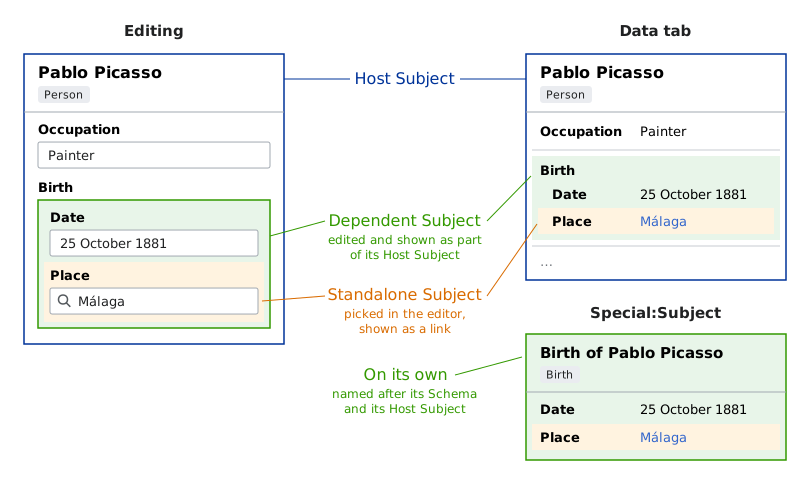
Schemas define whether their Subjects are Dependent or not (ADR 35).
Dependent Subjects are referenced exactly once, always by their Host Subject. They are created, edited, and displayed with their Host Subject, stored on its page, and deleted with it. They have no label and can never be Main Subject of a page.
Example: Book -> Chapter -> Section
In this example Chapter and Section are Dependent Subjects. Book and Chapter are Host Subjects.
Schema
A Schema (ADR 6) defines a type of Subject. Examples: Person, Company, Product, etc.

Schemas have a name, description, and a list of Property Definitions, and declare whether their Subjects are Dependent Subjects.
Property Definition
A Property Definition has:
- A name. Example: "Website".
- A type: a Property Type. Example: "url".
- Whether a value is required.
- An optional description.
- An optional default Value.
- Constraints: validation and data rules specific to the Property Type. Example:
"minimum": 42. Each carries a severity oferrororwarning(defaultwarning) that decides whether violating it can block a write — see Constraint severity. Not overridable in Layouts. - Display Attributes: presentation configuration specific to the Property Type. Example:
"precision": 2,"color": "blue". These serve as defaults that can be overridden per-Layout via Display Rules.
Property Type
The kind of data a Property Definition holds, and how it is edited and displayed. Examples: "text", "url", "number", "relation". Extensions can define additional Property Types (Extending NeoWiki). Each Property Type stores its values as one of the Value Types.
Avoid: "Value Format", "format" — former names of this concept.
Violation
A Violation is a single validation finding: a value that does not satisfy one of its Property Definition's Constraints (ADR 26). Validating a Subject against its Schema yields Violations; the possible kinds are cataloged in Validation codes.
Each Violation carries the Severity of the violated Constraint: warning Violations inform but never block, while error Violations can block saving, depending on the wiki's validation Enforcement setting.
Pages and display
Page
A page is an article with a title, as on Wikipedia: the place for free text and for showing Subjects.

Pages have
- A title: shown in the URL and as the page heading, can be changed by "moving" the page.
- Content: the page's text, written in wikitext. Subjects are stored alongside it, not in it (ADR 4).
- Subjects: list of Subjects, can be empty (ADR 7)
- Main Subject: optional identifier of a Subject in the page's Subjects list. Indicates which Subject represents the same entity as the page itself.
Page-first and subject-first wikis
A wiki-level setting decides which comes first (ADR 33).
Page-first: a page is about one thing, and its Subjects hold data about it. A new Subject goes on the page you create it from. This is the default.
Subject-first: each new Subject gets a page of its own, which shows it.
See how they differ.
View
A View is an on-page rendering of a Subject. Views are placed on wiki pages via the {{#view}} parser function, or automatically for a page's Main Subject where the page does not show it in full. Each View renders a Subject using a View Type.
A View can optionally reference a Layout to customize which properties are shown and how. Without a Layout, all properties are shown in Schema-defined order, except those whose values are Dependent Subjects.
View Type
The visual format used to render a View. Examples: "infobox", "card", "table". View Types can be defined by extensions.
Layout
A Layout (ADR 18) references a Schema and allows customized display of Subjects that use that Schema. The link is one-directional: Layouts reference Schemas, Schemas do not reference their Layouts.
Example: A company Schema has many properties. You want to display only some of them in your "Finances" page section. You create a finances Layout for that company Schema that shows only Revenue, Profit, and Assets.
Layouts have:
- A name: the title of the Layout's page, used to reference it (ADR 17)
- A Schema reference
- A View Type
- Display Rules: an ordered list that specifies which properties to show and how (see below)
- Settings: Layout-level configuration specific to the View Type (e.g.,
borderColorfor infobox) - Optional description
Avoid: "View" — the former name of this concept. A View is now the on-page rendering.
Display Rule
A Display Rule is an entry in a Layout's ordered allowlist: it references a property by name and optionally overrides its Display Attributes; unspecified ones are inherited from the Property Definition. Unlisted properties are hidden.
Query and export
Graph Store
A Graph Store is a database that NeoWiki projects wiki data into so it can be queried, such as Neo4j or SPARQL-capable stores. A wiki can have several Graph Stores, each identified by name. Each holds one or more Projections.
Avoid: "graph database", "graph backend", "triple store" (as names for this concept).
Projection
A Projection is a derived, query-optimized copy of the wiki's data in a Graph Store (ADR 19). Page content remains the source of truth; a Projection can be rebuilt from it at any time. Every Projection is one of two kinds: the built-in native projection, which uses NeoWiki's own vocabulary, or an ontology projection, defined by a Mapping. Export and query surfaces select a Projection by name.
Avoid: "base mapping", "target ontology" — former names for the native and ontology projections.
Mapping
A Mapping defines how Subjects that follow native Schemas are expressed in an established ontology such as EDM or CIDOC-CRM (Mapping Format). Each Mapping is a page in the Mapping: namespace and defines one ontology projection; the Mapping page's title is the projection name.
Page Property
A key-value pair stored on the Page node in graph Projections. Page Properties are metadata about the wiki page itself, as opposed to Subject Statements, which are structured data about the entities described on the page.
Built-in Page Properties include name, namespaceId, creationTime, lastUpdated, categories, and lastEditor. Extensions can contribute additional Page Properties (see Extending NeoWiki).
Extending
Source
Where a Subject comes from (ADR 23). A Source produces Subjects and resolves the Schemas they use. The wiki itself is the default Source, and the one Subjects are created in; extensions register others, each under a source key that prefixes the Subject IDs from it.
Subjects from another Source are read-only.
Flagged ambiguities
These terms are current but contested; expect them to change:
- View Type may be renamed to "Layout Type" (#925).
- "Allow multiple values", the
multipleschema field, and multi-part Values name one concept three ways (#712). - Subjects have a
labelwhile Schemas, Layouts, and Mappings have aname, and a Subject without a label is shown under a computeddisplayName(#1283).